


DTF Gang Sheet – Easy Creator
Price range: $0.01 through $19.20
Order DTF Gang Sheets- Create Your Own Custom Apparel
New to creating a gang sheet? No problem! Upload, size, and add the amount of transfers needed, and we’ll make the gang sheet for you with gang sheet pricing! This is a great option for anyone just starting out needing gang sheet pricing, but worried about the creation process.
Use these transfers to create your own apparel. These transfers are instant peel but you can cold peel them as well when pressing fine and small lines. The film peels like butter to make it quick and easy to create your own clothing designs.
Recommended For:
- Cotton or Cotton Blends
- Polyester and Poly Blends
- Canvas (Cold Peel Recommended)
- Most Textiles
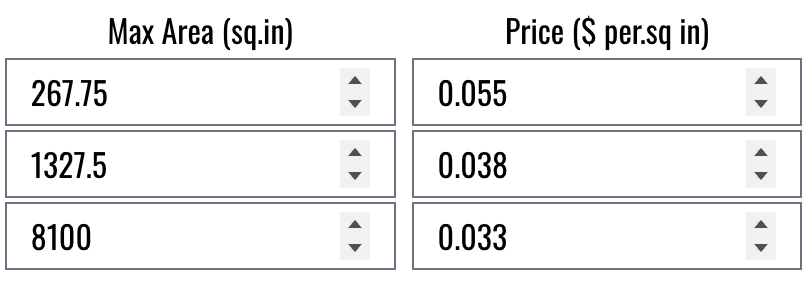
Pricing is by Square Inches Ordered – Bulk Pricing Shown Below
Recommended Tools
- Clam shell or swing away heat press (due to DTF pressure requirements)
- Heat press pads and/or pillows for pressing around buttons, pockets, and any uneven surfaces.
- Finishing Sheets
- T-Shirt Alignment Guides
- Canva Pro
Art Requirements
- Canvas size as big (or bigger than) your biggest print
- Make sure your art fills the artboard completely without going out of the canvas edges
- Transparent Background PNG
- 300+ DPI (dots per inch)
- This is the sizing slider on export from Canva (Select x3.125)
If you want to print a 12″ x 15″ print – the png file should be a minimum of 3600px by 4500px
- 12″ x 300 dots per inch = 3600px
- 15″ x 300 dots per inch = 4500px
Delivery
- Free Curbside Pickup Hut
- 1950 Peach Creek Rd. College Station, TX 77845
- Lockbox Number and Code will be provided in the tracking section of the “Order Complete” email
- Press the Circle Button to activate the lockbox
- Enter the 6 digit code provided in the tracking section
- Press the Key Button to unlock the box
- Lift up from the keypad and collect your order
Shipping
Print Orders under $50
- $8.50 Flat Rate Shipping
- Ships UPS or USPS Ground
- Shipping Time 1-5 Days depending on destination
Print Orders $50+
- Free Shipping
- Ships UPS or USPS Ground
- Shipping Time 1-5 Days depending on destination
Print Orders with Apparel AND/OR Expedited Options
- UPS Options for 1-3 Day Shipping
- Cost based on size, weight, and destination
Please choose your desired shipping method at checkout
Heat Press Details
- Cotton – 300-320° F
- Polyester – 275-295° F
Pressure:
- Medium Heavy – Heavy
- Hotronix Level – 7 or 8
Pressing Instructions:
- 1st Press – Pre-Press – 3-5 Seconds
- Press your garment only to remove wrinkles/humidity
- Once pressed, align the transfer onto the shirt
- You may fold the transfer to get the center point – this will not affect how the transfer looks on the clothing
- 2nd Press – Main Press 10 Seconds
- Press directly onto the film
- You can immediately remove the film
- Peel transfer across (not up) to remove the film and leave the graphic
- If you have tiny details or small fonts, you can cold peel.
- Allow transfer to completely cool – about 30 seconds-2 minutes
- 3rd Press – Finishing Press – 5-10 Seconds
- Place a finishing sheet of your choice over the transfer on garment
- Teflon
- Parchment Paper
- Canvas Material
- Place a finishing sheet of your choice over the transfer on garment
Pressing Instructional Video Available Below!
Before you use our easy builder, please acknowledge:
1. You must have full rights to this artwork. AI background removal tools can be used but they will not be ideal for printing and can cause a slight outline around your image being printed. Make sure your artwork has a transparent background for the best quality.
2. The premade sizing selectors are based on width (not height) of your image. If you have a long design you may want to custom add your length. We recommend no longer than 15″ long on an adult shirt and no longer than 8″ long on a youth shirt however shirt brand sizing can vary.
3. Artwork that is not 300 DPI at the size selected will not be optimal. We suggest making sure your artwork is at least 300 DPI before submission. 250-299 DPI will have “good” print quality and anything under 250 will be “bad”. Screenshots will NOT print well. If you need help with your artwork, please text us and we will give you a call to help you if possible.
By Clicking the “Upload Your Images” Button, you certify that:
– You have full rights or own this artwork
– Use of the Background Remove Tool or other tools is at your own risk and can lead to background colored borders around your image, etc.
– You will check the length if using the preset sizing options.
– You will check the DPI of your artwork at the selected size to see the submitted print quality.
Related products
-
 Price range: $1.00 through $25.00
 -
 Price range: $0.75 through $7.25
 -
 Price range: $8.00 through $225.00
 -
 Price range: $6.00 through $60.00
Reviews
There are no reviews yet.